 ScreenReel
Screen recordings
that polish themselves.
Turn your screen recordings into dynamic demos, with zooms
and a camera that follows your cursor and text… oh, and no typos!
Free · macOS 15 Sequoia or later · Windows coming soon
You hit record.
Real export · scroll to play
What happens after you hit stop.
Zooms in a beat before you click.
Every click becomes a smooth zoom, timed like an editor would cut it.
New project
Name
Description
You type. The camera follows.1
The camera follows your caret, so every line you type stays big and readable, even in VS Code and the terminal.
What you typed
In your video
Typed in 3.7 s · plays in 0.9 s
Type sloppy. The typos never make the cut.
You don’t need 100% typing accuracy: typos and their backspaces are cut from the video.
Your cursor, minus the shaky hand.
Your cursor is redrawn, never recorded: bigger, smoother, sharp at any zoom.
Want your recording to feel like a movie? Add motion blur. Or don’t.1
Cursor and camera moves get real motion blur, like a film camera’s shutter. Prefer it crisp? Turn it off.
Hi, I'm Sam from Northwind.
Let me show you how fast
it is to start a project.
Click New project,
give it a name,
and that's it.
Hi, I'm Sam from Northwind.
Let me show you how fast
it is to start a project.
Click New project,
give it a name,
and that's it.
A script only you can see.1
Your script scrolls under the camera, invisible to the recording.
Tighten this take: zoom on the clicks, cut the dead air.
- ●add_zoom0:04 · 1.9×
- ●cut0:12 → 0:15
- ●speed_up_typing0:19 → 0:26
Done: 3 edits. ⌘Z undoes any of them.
Ask Claude to tidy the take.1
Claude reads what happens in a recording, then adds zooms, cuts and typing speed-ups you can review and undo.
Your computer
ScreenReel ▸ Recordings
- Q4 launch demo1:22
- Onboarding walkthrough3:05
- Bug repro for Sam0:41
plan check
ScreenReel
Account
Plan
No recordings
Your recordings never leave your computer.2
Recordings, edits and exports stay on your computer. ScreenReel only checks your account and plan.
01
Capture
System capture
02
Render
GPU
03
Encode
Hardware encoder
Native app · no web wrapper
Built native, fast from capture to export.
A native app, not a web page in a wrapper: the GPU draws every zoom and the hardware video encoder does the heavy lifting.
16:9 for your site, 9:16 for the feed.1
One recording, exported for every place it goes, up to 4K.
Customize even more after the recording.
Everything ScreenReel did is a block on the timeline. Keep it, tweak it, or change it completely.
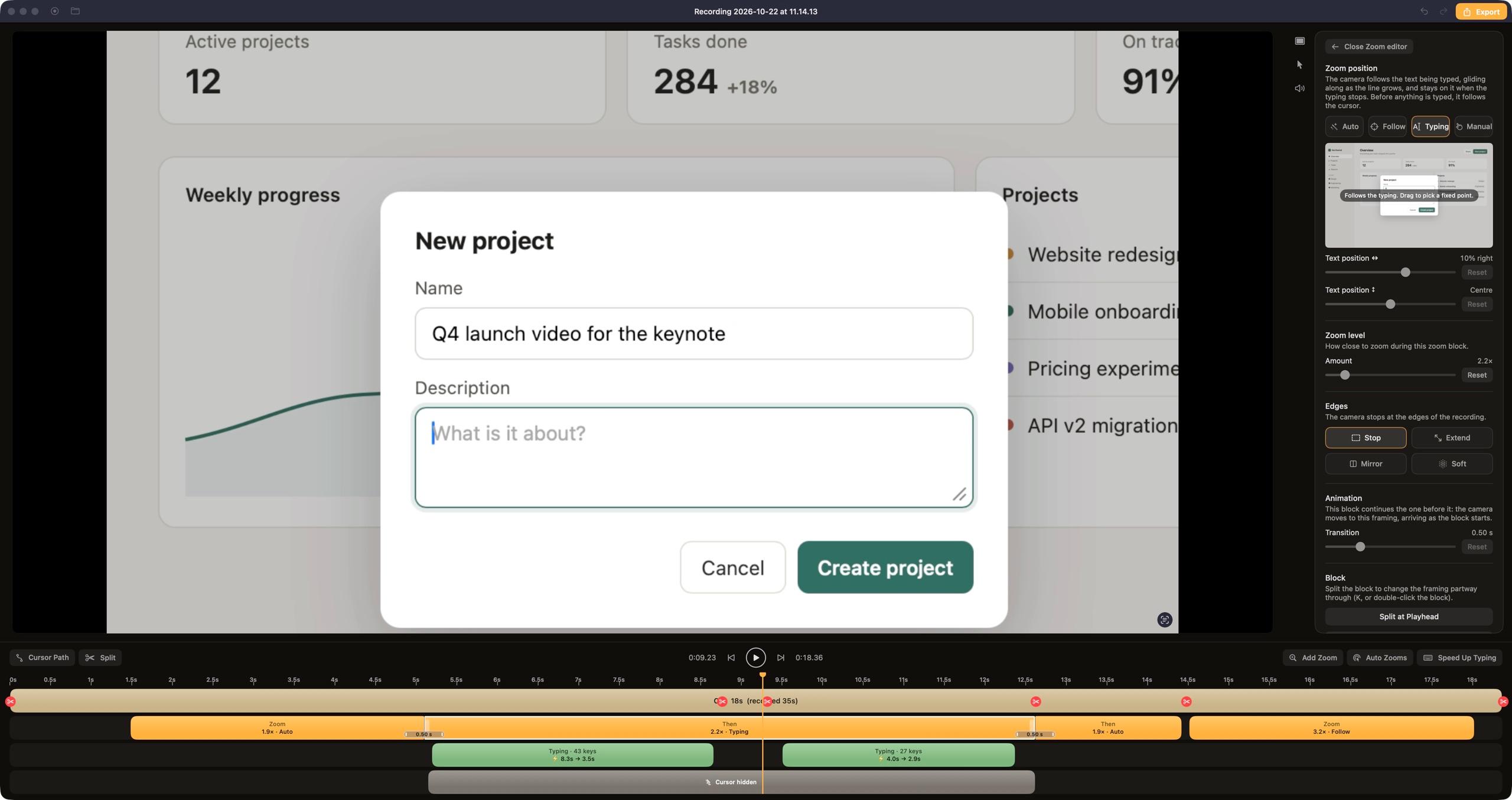
Zoom blocks
Drag, stretch or split them. Switch between Auto, Follow, Typing or a fixed spot.
The edit, already done.
Everything ScreenReel did to the take in the film above. Each line is a block on the timeline you can move, change or delete.
- 00:01.5ZoomIn on “New project”1.9× · auto
- 00:04.1ZoomOver to the Name fieldglide
- 00:05.1TypingCamera follows the caret2.2×
- 00:05.1SpeedName typed 2× faster8.3 s → 3.5 s
- 00:08.6CutA typo and its backspaces12 keys
- 00:08.6CutDead air before Description−1.4 s
- 00:09.5SpeedDescription typed faster4.0 s → 2.8 s
- 00:12.6ZoomGlide to “Create project”1.9× · auto
- 00:14.4ZoomPull back3 frames wide
- 00:14.5FollowLock onto the cursor for Launch3.2×
- 00:17.5ZoomEase outend
Free to start. Pro when it ships.
Free
$0/mo
- Auto zoom
- Smooth cursor
- No typos
- Watermark
Pro
$6.99/mo
- Everything in Free
- Text tracking, motion blur
- Teleprompter, webcam, 4K
- No watermark
- Editing with ClaudeBeta